Cookies & privacyYour privacy choices

We use essential cookies to run this site. Analytics, personalization and advertising cookies stay off unless you accept them. Privacy Policy

We use cookies for site features, analytics, personalization and advertising. Some US state laws call this “selling” or “sharing” personal data. Choose Reject to opt out, now or any time. Privacy Policy

A Proscris tool

Early access

Google Reviews Manager: collect Google reviews, draft owner replies and export review cards

Collect your Google reviews and reviews from other sites, draft owner replies in your own voice, compare competitors and turn real reviews into website cards.

Opens Google Reviews Manager in your browser, here on proscris.com.

  • Windows desktop app
  • Web browser
  • WordPress plugin
  • AI agents (MCP, WebMCP)
  • Version 6.0.0

Google Reviews Manager

Runs as: Windows desktop app, web browser, WordPress plugin, AI agents (MCP, WebMCP)

The purpose

What Google Reviews Manager does

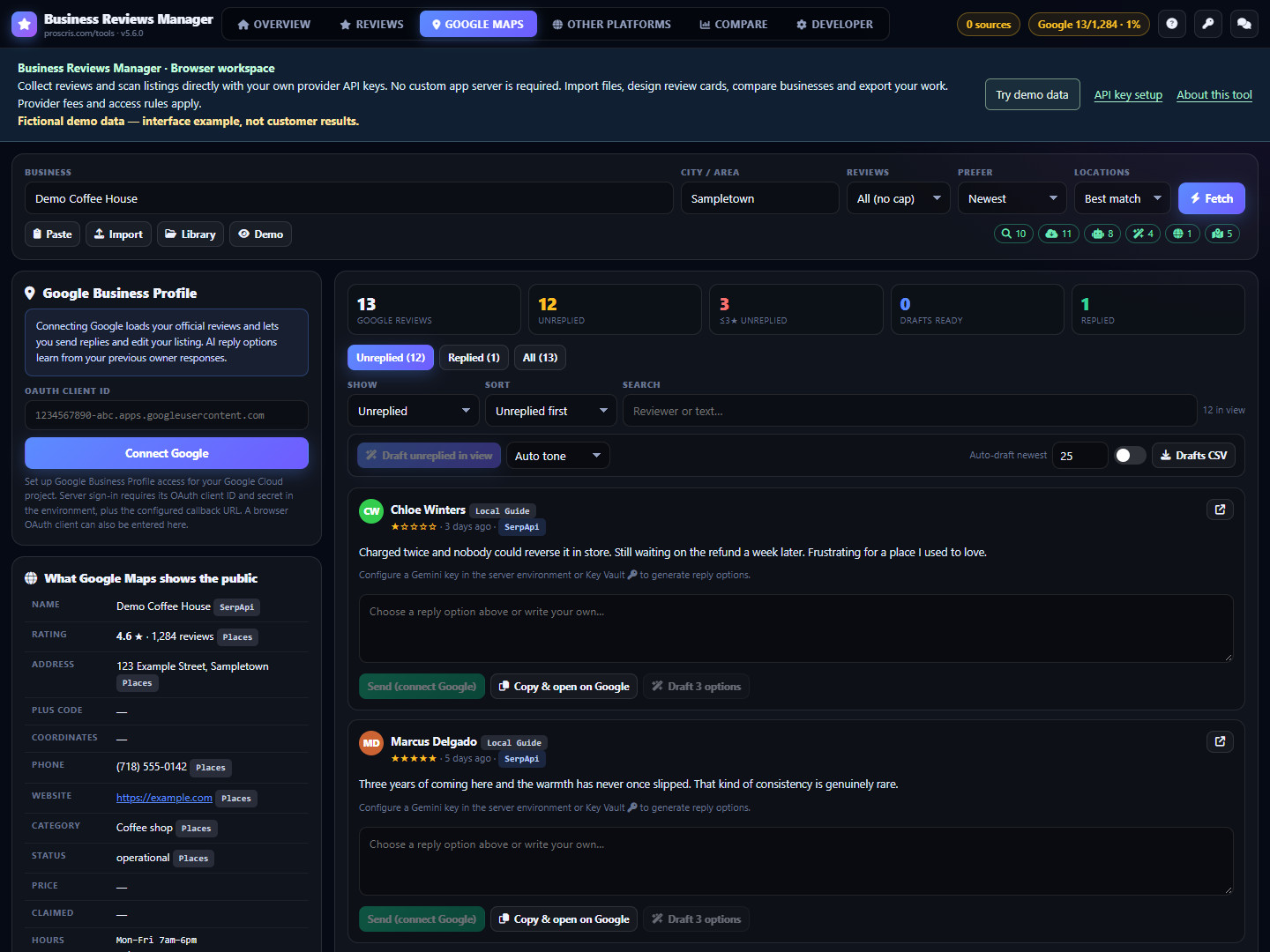
Google Reviews Manager is a review and reputation workspace that runs on your own computer. It collects a business's Google reviews, plus reviews from Yelp, Bing, Tripadvisor, Facebook, Trustpilot, wedding directories and other public pages, using your own provider keys. Every fetch is saved as a dated capture, so you keep a history of your reviews over time.

A reply queue puts unanswered reviews first. AI (Google's Gemini models, with your key) suggests three replies in the tone of the business's earlier owner replies. You edit one and send it through your connected Google Business Profile. You can also compare your business with up to three competitors, see review stats by month, and export review cards and a website embed that show every rating, not just the good ones.

It runs as a Windows desktop app or in your browser. A WordPress plugin imports your reviews into your site and shows them with a shortcode. AI assistants such as Claude can read reviews, write reports and save reply drafts through MCP, but nothing is posted until a person presses Send.
Problems it solves

  • We have dozens of unanswered Google reviews and no time to write good replies.
  • Every reply sounds different depending on who on the team writes it.
  • I want real reviews on our website without copying them over by hand.
  • I have no easy way to see how our reviews compare with nearby competitors.
  • Our reviews on Yelp, Tripadvisor and Facebook are scattered across different sites.

When to use it

  • When you need to clear a backlog of unreplied Google reviews in the business's usual tone.
  • When you need a saved record of your reviews over time, with a CSV for each fetch.
  • When you want review cards as PNG, WebP or JPG images for your website or social posts.
  • When you need to see how your rating and reply rate compare with up to three competitors.
  • When you want reviews from Yelp, Tripadvisor, Facebook or wedding directories in one place.
  • When you want an AI assistant to write a reputation report or draft replies for you to check.

Features

Google Reviews Manager features

  • Collect Google reviews through SerpApi, Outscraper, Apify or Google Places, using your own API keys.
  • Add reviews from Yelp, Bing, Tripadvisor, Facebook, Trustpilot, The Knot, WeddingWire and other public review pages.
  • Every fetch is saved as a dated capture with a reviews CSV, so you keep a history of every capture and can restore older ones.
  • Reply queue with unanswered reviews first, and three AI reply options in your business's own tone.
  • Edit a draft and send it through your connected Google Business Profile, or copy it and reply in Google Maps.
  • Update your listing's description, phone number and website once your Business Profile is connected.
  • Compare with up to three competitors: ratings, reply coverage, categories and profile gaps, with CSV export.
  • Export review cards as PNG, WebP or JPG, and a website embed of Google reviews that shows every rating.
  • Google's own rating totals are kept apart from the reviews you loaded, so your numbers stay honest.
  • AI assistants can search reviews, report on trends and save reply drafts through MCP. Nothing is sent without you.

Built for

  • Local business owners
  • Agencies that manage client reviews
  • Reputation and customer experience teams
  • Web designers adding reviews to client sites

Before you begin

How Google Reviews Manager runs

Windows desktop app, web browser, WordPress plugin, AI agents (MCP, WebMCP).

What you need

  • A Windows 11 PC with Microsoft Edge or Google Chrome.
  • Node.js 22 or newer installed on the computer.
  • Your own API keys: a review provider (SerpApi, Outscraper, Apify or Google Places) to collect reviews, and Gemini for reply ideas.
  • To send replies from the app: a Google Cloud project approved for the Business Profile API and a Google account that manages the business.
  • For the WordPress plugin: WordPress 6.9 or newer and PHP 7.4 or newer (plus the MCP Adapter plugin for AI agents).

Things to know

  • Collecting reviews and finding competitors use paid services billed to your own provider accounts. The app does not store prices.
  • Other sites give up to 200 reviews per platform, with no promise of full history. Pages that need a login or block access are reported, never filled in.
  • Only Google replies can be sent from the app. Other Business Profile features, such as posts, photos and performance reports, are not included.
  • The WordPress plugin is a first version, tested in WordPress Playground but not yet on a live site. Collecting reviews, making cards and sending replies stay in the desktop app.
  • Google Reviews Manager is an independent Proscris tool. It is not affiliated with or endorsed by Google.

Your data

Reviews, captures, reply drafts and card exports are saved as files in the app's folder on your computer, one folder per business, with any credentials removed from captures. Your provider keys stay in a private settings file used by the app on your computer, and are never copied into the browser or returned to agents. Data leaves your computer when you use a provider: fetching reviews contacts the review service you chose (SerpApi, Outscraper, Apify, Google Places or Firecrawl), AI reply suggestions go to Gemini, and sending a reply or editing your listing goes to Google through your Business Profile sign-in. By default the app only answers on your own computer. Hosting it needs an access token you create.

Get started with Google Reviews Manager

  1. Read the features and requirements on this page.
  2. Choose "Open Google Reviews Manager" and tell us what you want to do with Google Reviews Manager.
  3. We reply with how to get started.

Questions

Google Reviews Manager FAQ

Can I use Google Reviews Manager in my browser?

Yes. Choose Open Google Reviews Manager on this page to collect reviews with your own Apify, Outscraper or Firecrawl key, draft replies, export review cards and compare businesses. Keys and captures stay in your browser. Business folders, agents and the WordPress plugin need the desktop app.

How can I reply to Google reviews faster?

Open the Google Maps screen, where unreplied reviews come first. Pick one of three AI reply options written in your usual tone, edit it, and send it through your connected Google Business Profile.

Does it post replies automatically?

No. Drafts are only saved. A person sends each reply, and AI assistants connected to the tool can only save drafts.

What do I need to send replies from the app?

A Google Cloud project approved for the Business Profile API, an OAuth sign-in client, and a Google account that owns or manages the business. Without that, you can copy a draft and reply in Google Maps yourself.

Can I export my Google reviews to CSV?

Yes. Every fetch saves a reviews CSV in the business's folder, and the Compare screen exports CSV and JSON.

How do I show Google reviews on my website?

Export review cards as images, use the website embed, which shows every rating, or import your reviews into WordPress with the plugin and show them with a shortcode.

Can it collect reviews from Yelp, Tripadvisor or Facebook?

Yes, from public pages, up to 200 reviews per platform. Pages that need a login or block access are reported, and no reviews are invented to fill the gaps.

Can AI assistants like Claude use it?

Yes. MCP lets AI assistants such as Claude use the tool, on your computer or on a hosted copy with an access token. Collecting reviews costs money, so a paid fetch needs a cost check and an explicit confirmation first.

Google Reviews Manager in our work

Where this tool comes from, and the projects and clients we use it for. Every one of them is in our portfolio.

  • How we built it

    Google Reviews Manager

    Collect a business's Google reviews, draft owner replies, compare competitors and export review cards.

  • Case study

    Fit Movers 123

    A fitness-equipment mover we have grown since 2022, from a handful of enquiries a month to about two dozen a day.

  • Case study

    Gym Tech Fitness

    Page one of Google for its core service searches, a store of almost 2,900 products, and leads booked straight into the showroom.

  • Used in

    GymSpotter Reviews

    Real customer reviews of fitness-equipment businesses, ranked by a formula anyone can check.

Ready to try Google Reviews Manager?

Collect your Google reviews and reviews from other sites, draft owner replies in your own voice, compare competitors and turn real reviews into website cards.

Opens Google Reviews Manager in your browser, here on proscris.com.

Social Content HQ

Plan content calendars, write captions and paid ad copy, make on-brand ad images and get posts approved, for many brand accounts in one workspace.

Video Generator Hub

Write a brief and get a plan, a narration script and scenes, rendered to MP4 in landscape, vertical and square with captions, covers and post copy.

Preferences

Text Adjustments

Font Size
Default
Line Spacing
Default

Display & Color

Dims interface to dark colors
Enhances text & element contrast

Motion & Reading

Halts animations and smooth scrolling
High-legibility typography
Highlights text rows on hover
Expands mouse pointer visibility